Use LabVIEW to Construct State Machines
Statecharts Module of LabVIEW
Statecharts are useful in simplifying the design of applications that use complex decision-making algorithms. By constructing a statechart, you can visualize the flow of a complex decision-making algorithm and achieve a high-level view of an application. This view helps you improve the overall design of the application.
- National Instruments
Here’s some useful resources for reviewing this:
One Sample Provided by LabVIEW
I tried to download LabVIEW 2017 Education Version to get more familiar with this tool. I created a demo project call Simple State Machine. Here’s the project file structure and the overview:
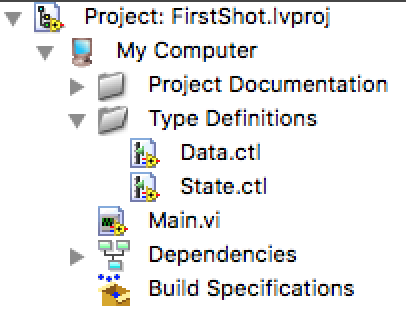
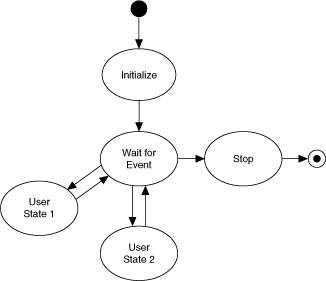
It is indeed a very simple project. What it does is simply pop up a dialog when you click a button and pop up another dialog when you click another button. Although it’s very trivial, it can be extended into very complicated model. The idea behind the notion is the thing that matter.
Here are some main points:
- Each state in the diagram above corresponds to a subdiagram of the Case structure in
Main.vi. Each state:- Performs some action
- Tells the state machine what the next state is by passing an instruction to a shift register on the While Loop.
- Each state has access to a cluster of data. The data types in this cluster are defined in
Data.ctl. - The valid states are listed in
State.ctl, which is a typedef. Using a typedef for state transitions restricts the transitions you can use, reducing the chances that the state machine gets into an unrecognized state. - Only the Stop state can stop the application.
Mechanisms
A typical LabVIEW project has a front panel and a block diagram. These two things are connected implicitly and internally. For example:
- If you create a
Round LEDin the front panel, you will automatically get abooleanvalue in the correspondingblock diagram. - If you create a
Waveform Chartin the front panel, you will get aWaveform Chart.(The name appears same by chance, not necessarily.)
All in all, making the flow of the program as visible as much is the main philosophy of LabVIEW.
Critical Thinking
LabVIEW is a wonderful visible programming tool, but it sometimes can be very confusing for programmers used to C. For me, it usually appears to be not that intuitive but confusing or even annoying:
Where one specific block is and what it exactly does can distract your attention very easily. Sometimes you may forgot where the structure is, and you will have to go through the hierarchical structure of the control menu. This operations cost time, along with the expanding of the menu having delays. It waste lots of time.
You can’t make good use of your keyboard for all kinds of operations in LabVIEW can only be done by using mouse, which is not very friendly to sophisticated programmer. As far as I am concerned, it heavily decreases the productivities of programmers.
The shapes of different structures can be very similar sometimes (e.g.
Case StructureandWhile). You will probably be misled by this subtle distinctions.When your logic becomes more and more complex, your
block diagramwill be filled with more and more wires crossing each other. If you want to delete or refactor your code in this case, you will fall into hell - you have to fix those broken parts and clean up those messy wires. In other words, for its limits in embracing changes, I think LabVIEW is not a good choice for big project.Its
labelare placed together with the main logic of the program. Their color is bright yellow, which can also distract your attention easily. And it often appears to be a mess in complex block diagrams.
In summary, we can use LabVIEW to build small to medium project but not big project. But I don’t think Agile/XP methodologies can apply to projects based on LabVIEW, which greatly limits the use of LabVIEW.